Photo guide
Tiny Desk AI photo requirements: which photos work best?
Short answer: use one sharp, well-lit, front-facing, chest-up photo of one person or pet per seat, as a JPG, PNG, WebP or HEIC up to 15 MB. Skip sunglasses, group shots, heavy filters, dark photos and faces that are small in the frame.
Updated
What does a good photo look like?
 Good ✓
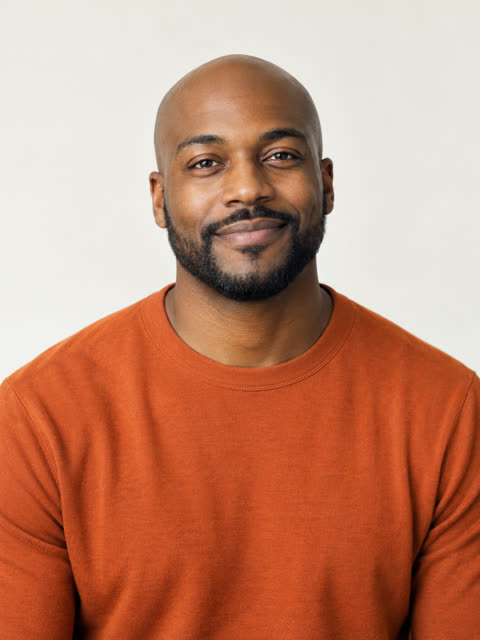 Good ✓
 Good ✓
 Good ✓
 Good ✓
- One person, face fully visibleCrop out everyone else before you upload.
- Sharp and evenly litDaylight or soft indoor light, with no hard shadows across the face.
- Front-facing or a slight three-quarter turnBoth eyes visible, looking near the camera.
- Chest-up framingThe face should fill a good part of the photo.
- An outfit you likeWhat the person wears tends to show up in the video.
All example photos on this page are synthetic adults made for this site, not customers.
Which photos should I skip?
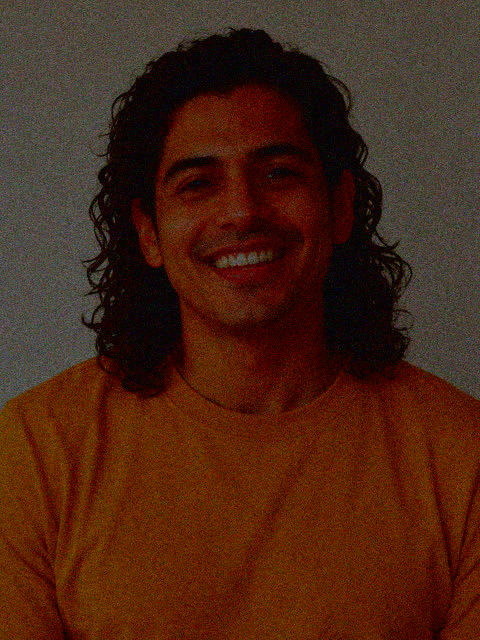 Skip ✕
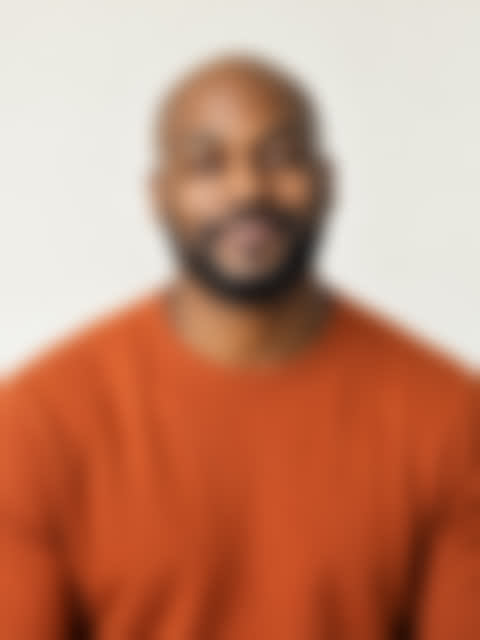 Skip ✕
 Skip ✕
 Skip ✕
 Skip ✕
Each “skip” example is one of the good photos above, edited to show a single problem: too dark, blurred, heavily filtered, a tiny face in a big frame, or three people in one shot. They are the most common reasons a result looks less like the person.
Also skip sunglasses, masks, hat brims over the eyes, strong side profiles, cartoons and AI avatars, and any photo of a celebrity, a public figure, someone who has not agreed to it, someone else’s child, or anything NSFW.
Which file types and sizes work?
| Format | Works? | Notes |
|---|---|---|
| JPG / JPEG | Yes | The safest choice. |
| PNG, WebP | Yes | Screenshots work if the face is sharp. |
| HEIC / HEIF (iPhone) | Yes | Converted in your browser before upload. |
| Over 15 MB | No | Use a smaller copy or a screenshot of the photo. |
| RAW, video, GIF | No | Export a still photo first. |
Does the lead need a better photo than the band?
Yes. The lead singer gets both close-ups, including the six-second shot with the big grin, so this photo decides whether the joke lands. Use your sharpest, most front-facing picture here.
Keys, sax, back-left and back-right appear in wider band shots and the sax solo. The same rules apply, but small flaws matter less. The five-person guide shows which shots each seat appears in.
What do the upload errors mean?
| Message you see | Usually why | What to do |
|---|---|---|
| “That photo is over 15 MB.” | The file is larger than 15 MB. | Export a smaller copy or take a screenshot of the photo. |
| “That file type isn’t supported.” | RAW, video or another format. | Use JPG, PNG, WebP or HEIC. |
| “We couldn’t open that photo.” | The file is damaged or still syncing. | Save it to the device first, then choose it again. |
| “We couldn’t read that photo from your device.” | The browser lost access to the file. | Choose the photo again. |
| “That photo is too detailed to prepare.” | A very large panorama or scan. | Crop to the person or use a smaller copy. |
Why doesn’t my video look like me?
Almost always it is the photo. A small, dark, blurry, filtered or angled face gives the AI less detail to work with, and sunglasses or a hat brim hide the eyes it relies on. Swap in a sharper, front-facing photo taken in soft light and make the video again.
If a render fails outright, everything reserved for that video comes back to your account automatically. Wondering whether a template would be easier? See CapCut template vs AI video, or go back to the Tiny Desk AI video generator.
Questions people ask
What photo works best for Tiny Desk AI?
One sharp, evenly lit, front-facing, chest-up photo of one person or pet, with both eyes visible and the face filling a good part of the frame.
Can I use a photo of my kid or my pet?
Yes. Anyone who said yes works: you, friends, family, even your pet. Kids are welcome when you are their parent or guardian. No celebrities, public figures or NSFW.
Can I use an iPhone HEIC photo for Tiny Desk AI?
Yes. JPG/JPEG, PNG, WebP, HEIC and HEIF all work, up to 15 MB. HEIC photos are converted in your browser before upload.
Can I use a selfie?
Yes, if it is sharp and the whole face is visible. Hold the phone at eye level; very close, wide-angle selfies distort the face.
Can I use a group photo?
Crop it to one person first. Each seat takes one photo of one person, so a five-person band needs five separate crops.
Do glasses or hats work?
Clear glasses usually work. Sunglasses, masks and hat brims that shade the eyes make the result less recognizable.
Why doesn’t my Tiny Desk AI video look like me?
Usually the photo: a small, dark, blurry, filtered or angled face gives the AI less to work with. Try a sharper, front-facing photo in soft light without sunglasses.
Do I need a photo for every seat?
No. Only the lead is required. Empty seats keep fictional AI musicians.
Are my photos public?
No. Photos are used only for your video and deleted after 24 hours. The finished video is private to your account.
More guides
- How to make an Outstanding Tiny Desk AI videoPick the lead and band, choose photos that work, then check and download the finished video.
- The Outstanding Tiny Desk meme, explainedWhere Charlie Wilson’s clip and The Gap Band’s song come from, and why the AI version spread.
- Outstanding Tiny Desk AI template: CapCut vs AI videoWhat a CapCut template can and cannot do, shot by shot, and how the band version is made.
- How to make a five-person Tiny Desk AI videoThe five seats, which shots each one appears in, and what one to five people cost.
- Tiny Desk AI free previewWhat you can see free with no sign-up, what the full video adds, and how to try it.
- What is Tiny Desk AI?What the tool does, what you get, who it is for and what it will not do.
- Tiny Desk AI app or CapCut?There is no app to install. How to make the video in your phone browser.
- NFL fan Tiny Desk AIPut your tailgate crew or fantasy league in the band. No players or coaches.
- Tiny Desk AI generators comparedPrice, length, resolution, free preview and refunds of four sites, side by side.
- Tiny Desk AI video generatorUpload your photos and make the video.
Your turn.
Choose the lead, add up to four friends, and get a private 19-second video with the original song.
Tiny Desk AI is an independent parody tool, not affiliated with or endorsed by NPR, Tiny Desk, Charlie Wilson or The Gap Band. “Tiny Desk” is a trademark of NPR.